Blog Archives

Quiz: What type of digital researcher are you?
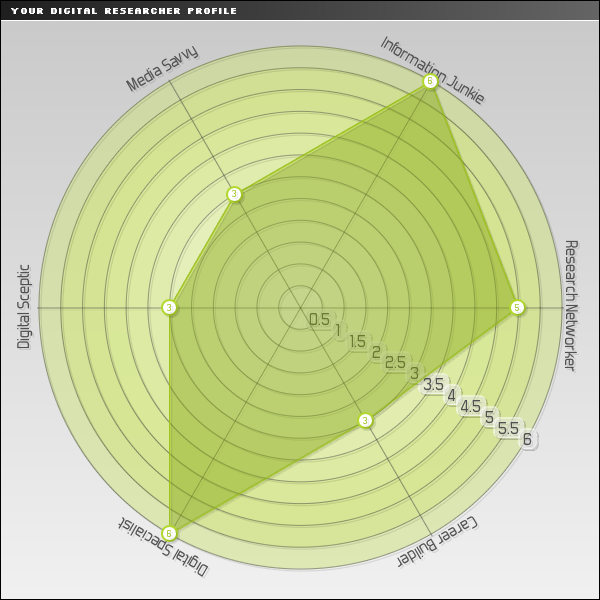 Rachel Maxwell, one of my Learning Technology colleagues, has just drawn my attention to this quiz from the University of Exeter: What type of digital researcher are you?
Intended for research students, the quiz comprises a series of short questions, designed to establish the areas of digital scholarship you already find valuable and to identify areas you might like to think of developing further.
Outputs include your rating on a series of axes: media savvy; infomation junkie (that’s me!); research networker; career builder; digital specialist; and digital sceptic.
Why not give it a go? – it is Friday afternoon after all!

Mendeley bought by Elsevier
Are you a Mendeley user?
If so, you may be interested to see what happens now that Mendeley has been bought out by Elsevier.
At £65m the benefits to the creators of Mendeley are clear to see, but how will its user community fare under the new ownership? There seem to be some concerns among academics that Mendeley will lose some of its independence and openness – you can follow the discussion here.
Update 16/4/2013: Further discussion from Research Information here.
Thanks to Ray Kent from De Montfort University for sharing this news on the JISCmail MORE list.

Caveat lector: a lament for Google Reader
Perhaps we were asking for trouble posting about the demise of Connotea and Posterous, because now look what’s happened: Google Reader has caught the fever and will be disappearing on July 1.

Another one bites the dust…
There are a number of potentially useful reference management tools on the web – Mendeley, CiteULike, Zotero and Connotea spring to mind. The best of these offer a range of other services, such as full text uploads, social bookmarking and a variety of other networking opportunities for researchers.
But can you trust these sites? Will your data be secure and are you sure that you will be able to access them when you need to?

Assessing journal quality – alternatives to JCR
Journal Citation Reports (JCR) is the definitive source for journal impact factors, probably the most widely recognised quality indicators for journals. But what do you do if your subject area is not well covered by JCR or you would like to see some alternative metrics?
There are a number of tools available. These use a combination of citation analysis, peer review and ranking algorithms to facilitate the evaluation of journals in a range of subject areas.

RSS tips #3: Mac options, and subcribing by email
I’ve had some feedback on our post about subscribing to the blog in Outlook, which has led me to discover that Microsoft Office for Mac doesn’t currently offer RSS support – so the post isn’t much use to Mac users.
This is disappointing, and is compounded by Apple removing RSS support from Safari and Mail apps in the latest version of OSX. A good solution is subscribing using a web-based, cross-platform service such as Google Reader, which I’ll look at in an upcoming post.
I’ve also added the option to subscribe by email. This uses Google’s Feedburner service, which will send you a daily digest of new posts. You’ll see the link in the new Subscribe widget on the right of the page.
New Workshop: Follow research activity with social media
 Keeping up to date with the research activity of others in your field is crucial for all researchers.
This brand new workshop introduces ways to make the information you need come straight to you! Even if you already use social media, this session will introduce you to alerting services, RSS feeds and research relevant websites which you can quickly and easily monitor without hassle.
Highly relevant and extremely valuable workshop for all research students.
Wednesday, 28 November 2012 from 16:00 to 18:00
T-Pod, Rockingham Library, Park Campus, University of Northampton
Book at http://socmedia2nov12.eventbrite.co.uk/

RefWorks induction 2012: notes and links
This is a follow-up post to the research student induction RefWorks training, with notes on the session and some useful links. Those of you who attended the attempted session will be amused (hopefully) to learn that the authentication problem was fixed shortly after everyone went home, and RefWorks logins are now working as they should.

NELSON and RefWorks – capturing your references

FAQ: How can I save items from NELSON to my RefWorks account?
NELSON is Library and Learning Services’ new resource discovery tool. It searches across a range of services including journals (full-text and abstract), ebooks and the library catalogue.
While researchers often benefit from searching databases directly, one advantage NELSON offers is a standard interface for several functions and services, including RefWorks, the University’s reference management software. RefWorks lets you collect, manage, share and annotate your references, and helps you cite them in Word. Whatever you find in NELSON, exporting it to RefWorks is quick and painless. In this post I’ll show you how to copy single and multiple items from NELSON into your RefWorks account.
RSS tips #1: follow Research Support Hub using Outlook
Flexible access to information is a cornerstone of blog technology. In this post I’ll demonstrate how to keep up to date with Research Support Hub in Microsoft Outlook, using RSS – the behind-the-scenes technology that binds the modern web together. With RSS, you won’t have to check our website to see new content – when something new appears, Outlook will fetch it for you and let you know.
 UON Graduate School Blog